The purpose of this document is to explain best practices for arabian-servers discord admins. This is to ensure that we have a guideline we can always refer to and work with.
This section is about the moderation rules, practices and useful tips.
To moderate the server properly you will need to know how to do many actions. These actions are granted to you by your Admin role in the server and they include Ban, Timeout, Kick, Delete message, Mute, and Deafen
On PC, you can right click a user’s picture/username and a menu will open as seen below.
When banning/kicking a user. A window will open where you will include options.
From mobile, you can do something similar by clicking and holding on someone’s profile image and when the menu opens, you scroll down to see ban/kick options.
Timing out a user is similar to “gag” in Counter-Strike. But in addition to not being able to chat, the user is forbidden from joining any voice channels for the duration of the timeout. Please refer to How to timeout users article to know more about it.
If they break any of the server’s rules which you can find in #rules channel.
Almost never, since they can just rejoin the server right back.
For very serious offenses which include Racism, Server Raiding, Supporting Israel, Sending NSFW or disturbing content on the server and sexually harassing any members.
There are probably more cases I’m not mentioning, we trust you are grown up and know what you are doing. But if you are unsure what to do, timeout the user first then ask managers what needs to be done.
No. You need to always provide it. You can provide the reason for the action as seen below.
It should be incremental. So for example, you timeout someone for 5 mins, then if they repeat the offense, for 10, then 30, then an hour, then a day and so on.
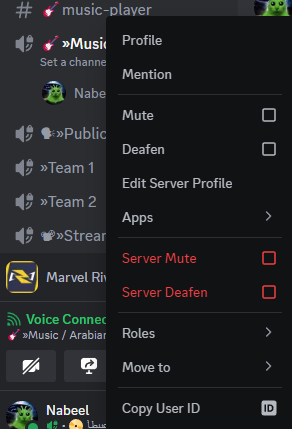
On PC, you can right click on someone’s image inside the channel they are in, and a menu will open showing options in red as seen below.
When muting someone, no one else in the channel will be able to hear them anymore. But they will still be able to chat on the server.
When deafening someone, they will still be able to talk and others will hear them in the channel, but they won’t be able to hear anyone else.
No, except for cases where someone is spamming too many messages that are NSFW/disturbing.
When they are insulting others or sharing NSFW/disturbing content.
This section explains some of the rules and practices you need to follow when interacting with other users in the discord server.